WhatsApp shared inbox
Your whole team and an AI agent on the same WhatsApp number
Ciarem gives your team a shared inbox where several people and an AI agent answer customers from one WhatsApp number. Each chat shows who is handling it and keeps the customer's full history, and a built-in CRM tracks every contact's stage and owner. Conversations from Instagram, Messenger and your website chat arrive in the same inbox.
- No credit card. Cancel anytime.
What goes wrong when a team shares one phone
When several people answer WhatsApp from one phone, nobody can see who replied to which customer. Two people answer the same chat, or nobody does, and older chats drop down the list without a reply. The history stays on that one phone, so when a shift ends or someone leaves, the next person has no record of what was quoted, which stage the customer is in or who owns the lead.
AI and people in one inbox, with the customer's history
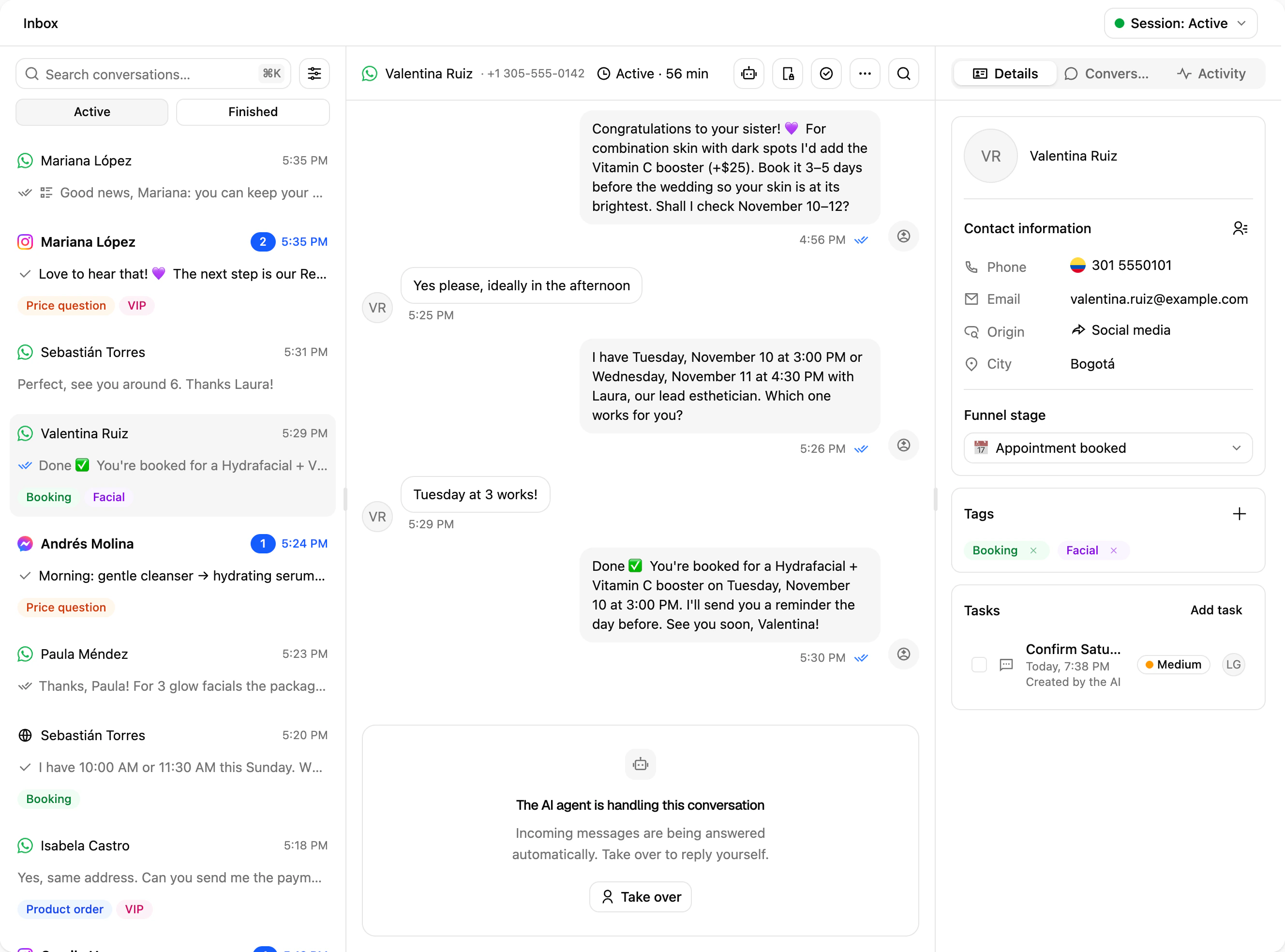
In Ciarem the AI agent and your team work the same conversations in the same inbox. Each chat shows whether the AI or a person is handling it, and the timeline marks when the AI took over and when it handed the chat to a person. A handoff arrives with an AI summary of the conversation so far. The contact panel in the inbox shows the customer's funnel stage, owner, origin and custom properties, and internal notes let teammates leave context the customer never sees.
How it works
- 01
Connect your WhatsApp number
Sign in with Facebook in Meta's signup window and pick your number. Connect it as a dedicated WhatsApp Business API line, or with Coexistence to keep the WhatsApp Business app working on the same number. You can add Instagram, Messenger and your website chat to the same inbox.
- 02
Invite your team and organize it
Invite each person as an Admin or an Agent. Group people into teams such as Sales or Support and label conversations with tags. Assignment rules split the chats the AI transfers among a team's available members, by round robin or at random.
- 03
The AI answers first and hands off to a person
The AI agent replies to incoming messages and hands the conversation to a person when one of your transfer rules applies. Each rule can send it to a specific team or teammate. A teammate can also take over a chat from the AI at any time and hand it back when they finish.
What your team gets
One team inbox for every channel
WhatsApp, Instagram, Messenger and website chat conversations arrive in one list, each marked with its channel. A contact's history on a channel reads as one thread, with every past conversation in it.
Shared inbox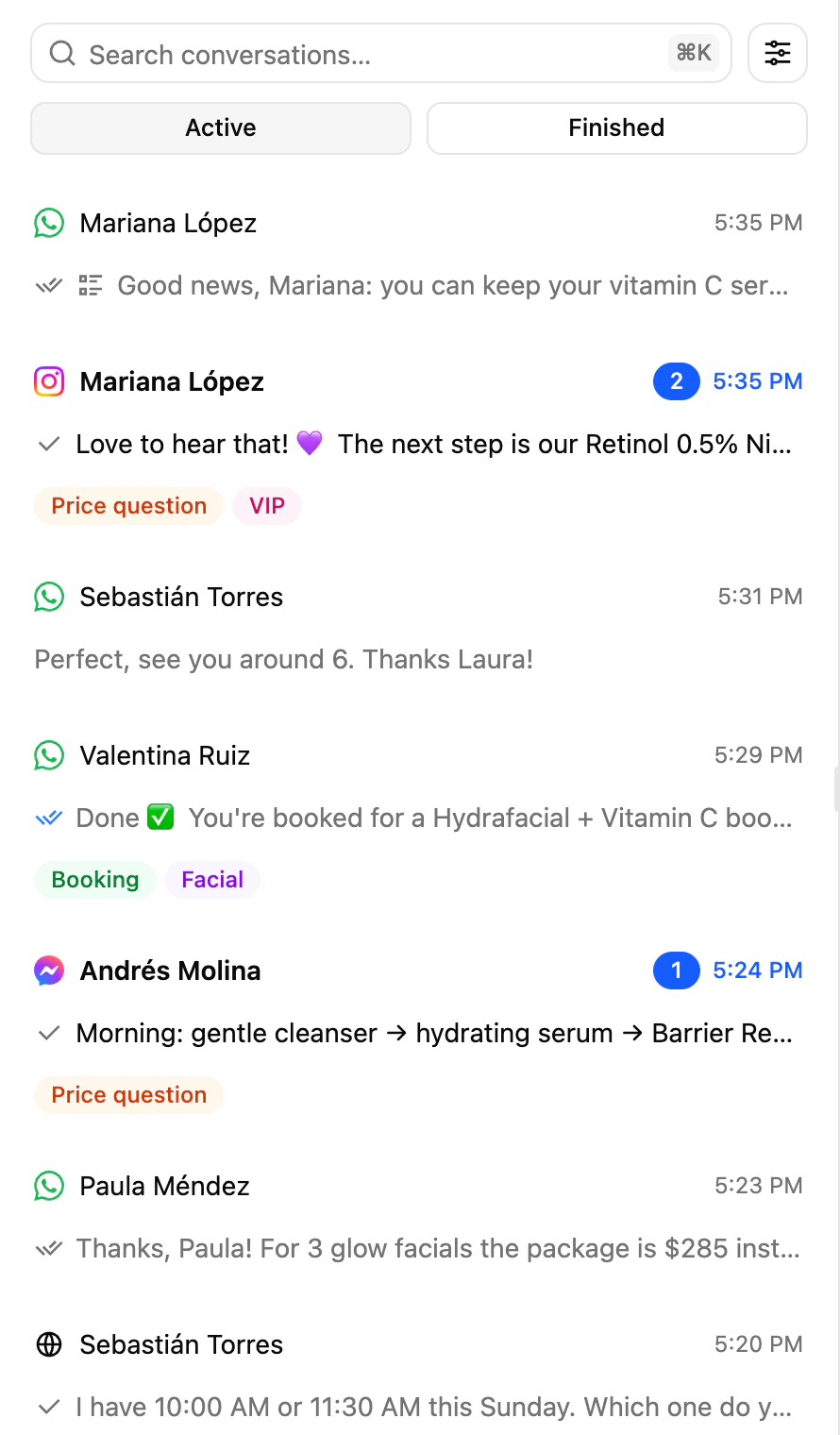
A built-in WhatsApp CRM
Everyone who writes to you becomes a contact automatically and lands in your initial funnel stage. Each contact can have an owner and your own custom properties. Work the pipeline on a board view, save segments and let the AI move contacts into a stage when the conditions you set are met.
Contacts (CRM)Roles, availability and the mobile app
Admins see every conversation. Agents see only the chats assigned to them and the contacts they own. Each person can pause new conversations while they are away, and the Ciarem mobile app sends push notifications for the conversations assigned to them.
Mobile appCommon questions
Related features
- Shared inboxEvery channel in one inbox, with the AI working in the open
- Assignment and teamsRoute each chat to the right person, and only to who's available
- Contacts (CRM)Every chat becomes a contact, with stage, owner and history
- Mobile appYour inbox and contacts on iPhone and Android, with push alerts
- Keep your WhatsApp numberKeep the WhatsApp Business app on your phone and add the AI
- Human handoffTransfer rules that bring in a person at the right moment
Keep reading
Try the shared inbox with your team free for 14 days, no credit card needed.
- No credit card. Cancel anytime.